What Keychron actually sells
Keychron makes mechanical keyboards, and it makes a lot of them. The UK store lists a portfolio of more than forty keyboard models across roughly ten named series, plus a small line of mice and a trackball. Keyboards are the business; everything else is a sideline.
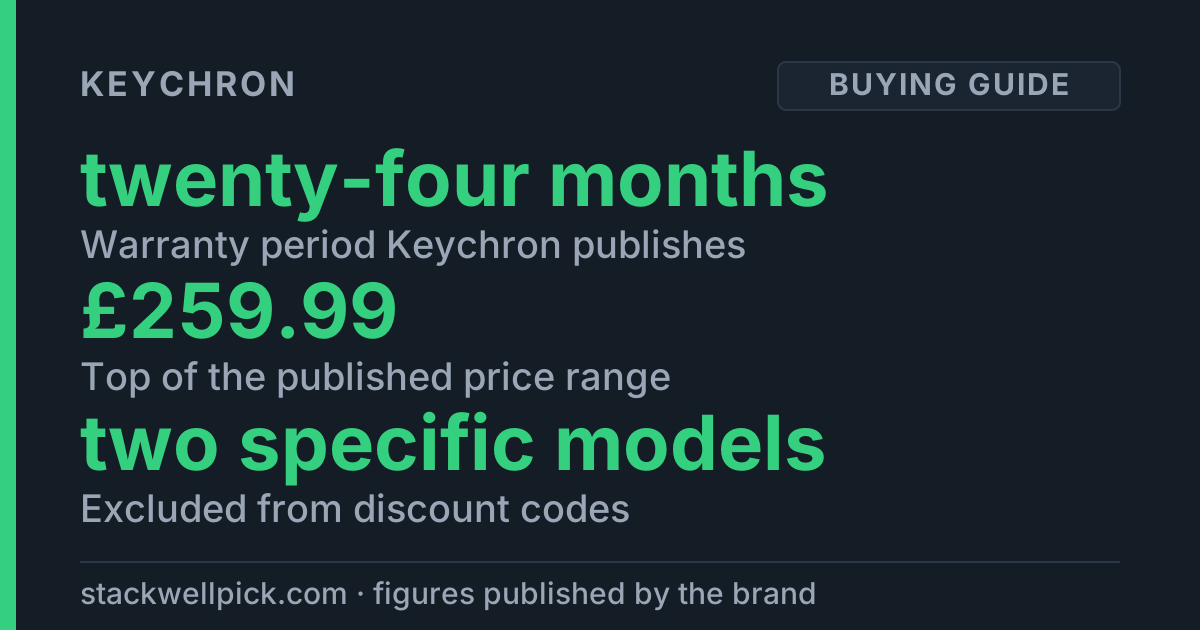
That breadth is the actual problem with buying one. Most brands we cover sell a single product in three sizes. Keychron sells around sixty items whose names differ by one letter or one word, and those small differences move the price from £49.99 to £259.99. So this is not a verdict on one keyboard. It is a map of the five decisions the range genuinely asks you to make, written from what Keychron publishes on its own UK site.
Decision one: the series is the price tier
The series name is the first thing in every product title, and it is the closest thing Keychron has to a price ladder. The Q Series is described by the brand as its premium custom range, and that is where the £200-plus boards sit. The B Series and C Series are at the other end — the B1 Pro Ultra-Slim and the C3 Pro both start at £49.99, which is the floor for the whole catalogue.
In between sit the K Series and the V Series, with Lemokey and a collaboration line off to one side. If you are working backwards from a budget rather than forwards from a feature, picking the series first removes most of the catalogue in one move.
Decision two: "Max" is about connectivity, not speed
The Max suffix is the one most often misread. On Keychron boards it signals connectivity, not performance: a Max model carries wired, Bluetooth and 2.4GHz wireless together in the same keyboard. If you only ever plug in, you are paying for two radios you will not switch on.
The 2.4GHz receiver is also where the polling-rate difference lives. Keychron publishes 1000 Hz for the Q1 Max over 2.4GHz and over cable, and 90 Hz over Bluetooth. The K2 HE is listed at 125 Hz on Bluetooth. Whatever you make of those numbers, the pattern is consistent across the range: Bluetooth is the convenience mode, and the dongle is the fast one.
Decision three: "HE" means magnetic switches, and it locks you in
HE stands for Hall Effect. These boards use magnetic switches rather than conventional mechanical ones, and Keychron positions them as the most gaming-focused choice in the range.
There is a constraint here worth knowing before you spend, because it runs against the reason most people buy into this category. Keychron states that the K2 HE does not accept other magnetic switches — it names the Gateron Magnetic Jade specifically as unsupported. So an HE board is not a hot-swap playground. If swapping switches later is a large part of why you are buying a mechanical keyboard, the hot-swappable boards are the ones to look at: the Q1 Max, for instance, is published as hot-swappable with both 5-pin and 3-pin switches.
Decision four: layout size, and the ISO question that decides everything
Keychron publishes the usual size ladder — 100%, 96%, 80%, 75% and 65%, plus a separate numpad if you want to add one back later. That part is straightforward.
The part that is not straightforward, and the single biggest reason to walk away from this particular store, is the key layout. The UK site is an ISO store. Its variants are UK, German, Swiss, Nordic, French and Spanish. If you want the ANSI layout — the US-style layout with the long horizontal Enter key — this is not where you buy it. No amount of comparing series will fix that, and it is not a detail you notice until the box arrives.
Decision five: profile and assembly level
Two smaller forks. Normal profile versus Low profile changes the height of the keycaps and switches, and it is largely a comfort preference rather than a performance one. Fully Assembled versus Barebone decides whether switches and keycaps are in the box at all; Barebone is cheaper and assumes you already own the parts you want.
What the UK store publishes about shipping, returns and warranty
This is where the UK store is genuinely better documented than most brands we research, so it is worth laying out plainly.
Shipping is free on orders over £30, with a £2.50 fee below that. Keychron publishes a dispatch window of two to three business days and a standard delivery estimate of one to three working days from dispatch, out of a UK warehouse. It does not publish which carrier it uses, and it does not publish a list of countries it ships to or what shipping costs outside the UK.
Returns run on a two-stage clock: fourteen days from the day after delivery to tell them, then a further fourteen days to actually send the item back. You pay the postage if you simply changed your mind. There is no restocking fee, which is more generous than several brands in this category.
Warranty is twenty-four months for customers in the UK and Europe, and the brand notes that your rights under the Consumer Rights Act 2015 are unaffected. The important qualifier is that this covers direct purchases only — Keychron states it cannot handle, accept or decline warranty claims for units bought through other websites. If you were planning to price-shop this brand across marketplaces, that is the cost of doing so.
What Keychron does not publish
A review that only lists what a brand says is a brochure. Here is what we went looking for on the UK site and could not find.
No carrier is named and no ship-to country list exists, so non-UK buyers cannot price delivery before checkout. No turnaround time is published for a warranty claim once it is accepted. The number of Bluetooth devices a board can pair with is not stated. Battery capacity and runtime are published for the flagships — 4000 mAh and up to 180 hours on the Q1 Max, up to 110 hours on the K2 HE — but not for the cheaper B and C Series boards, which is exactly where a buyer on a £49.99 budget would want them.
Switch specifications are also thin: no rated lifespan in keystrokes, no measured noise level, and no per-model weight. The collection pages render their contents with JavaScript, so we could not read the full per-series product lists directly. We are not going to fill those gaps with estimates from elsewhere.
Who should skip Keychron entirely
Anyone who needs an ANSI or US layout. The UK store is ISO only, and that is a hard stop rather than a compromise.
Anyone outside the UK and Europe. The two-year warranty is written for those customers, and the shipping terms outside the UK are not published at all.
Anyone who already bought a Keychron from a marketplace and wants support. Warranty claims are direct-purchase only.
Anyone with a budget under £49.99. That is the floor of the catalogue, not a sale price.
Anyone who expects free change-of-mind returns. You pay to send it back.
One thing to check before you use a code
Worth knowing if you came here for a discount: Keychron publishes explicit exclusions on two specific models. The Q1 Max and the B1 Pro are both listed as not accepting discount codes. A code is not going to apply at checkout on those two, whatever it says on any coupon site — including this one.
That is not a complaint about the brand; it is a published term, and it is better to know now than at the payment screen. The practical move is to apply a code to a K Series, V Series or C Series board, where no such exclusion is published, and to treat the Q1 Max and B1 Pro as full-price purchases.
If you want to see what is currently live, our Keychron coupon codes page lists each offer with the conditions attached, and the brand sets out its own shipping and warranty terms in its published FAQ.